Partially AI-modified / AI transparency: This publication is AI-assisted and human-reviewed. Constantin Korte assumes editorial responsibility. See AI Transparency.
One DevEnv YAML can describe a full VCF lab handoff: tools VM, database VM, VKS cluster, packages, DNS, certificates, ingress, and app deployment.
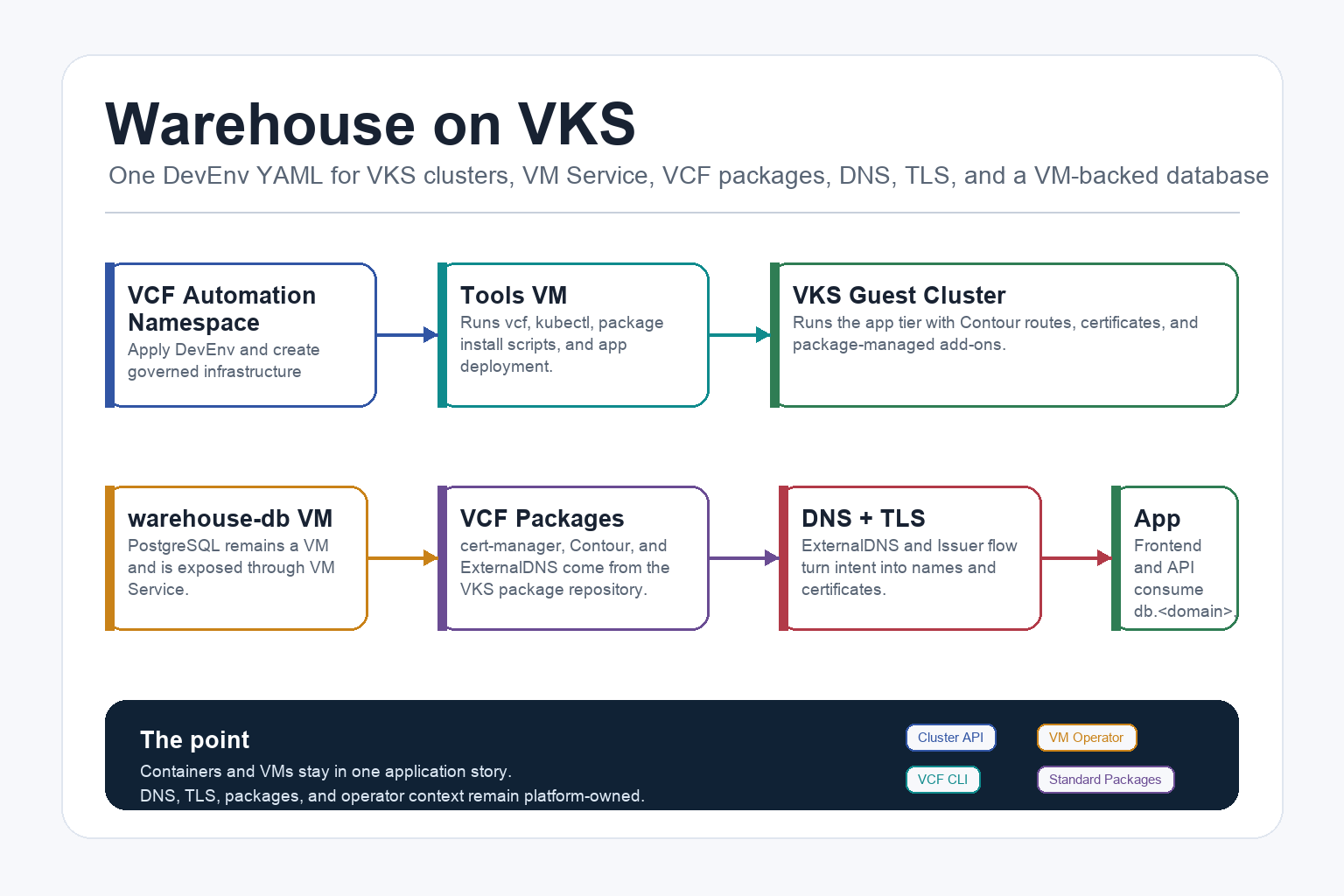
This is a practical Warehouse lab on VMware Cloud Foundation. The point is not to show a pretty Kubernetes demo. The point is to show what a real platform handoff can look like when VKS, VM Service, VCF CLI, DNS, certificates, package installation, and VM-backed services are treated as one operating model.
The happy path is deliberately simple: apply one DevEnv YAML into a VCF Automation namespace. That single YAML creates the tools/code VM, the database VM, the VKS cluster request, the package-installation scripts, the app manifests, the DNS and certificate intent, and the service exposure. If the platform infrastructure is already ready, this feels close to “run the YAML, go to the tools VM, run the operator steps, and the lab comes up.”
This article assumes VCF itself is already deployed and usable. In practical terms, that means VCF Automation, a Supervisor/VKS path, a project or namespace for the lab, package access, DNS, registry access, and certificate material are available or can be prepared. If VCF is not set up yet, start with the Broadcom VCF deployment path first, then come back here once the platform can accept DevEnv objects in a governed namespace.
Most of the generated files are not things you manually paste one by one. The operating systems execute the automatic bootstrap scripts during VM startup. The manual part is intentionally small: connect to the tools VM or its browser code surface, then run the three operator scripts that create the cluster, install platform packages, and deploy the application. Those three steps could also be moved into auto-start later, but keeping them explicit in this article gives clean checkpoints for learning and debugging.
The best experience comes after the prep work has been done once. ExternalDNS can update the zone, cert-manager has issuer material, the registry and package repository are reachable, and the VCF token/context path is known. From that point onward, the YAML becomes the handoff artifact you can repeatedly apply in a lab without re-learning the whole platform every time.
The reader I have in mind has maybe written a little Python and has heard words like API, token, kubeconfig, DNS, and VM. You do not need to be a VCF specialist to follow the article. I will keep the contexts explicit, because most failed first attempts are not caused by one bad command. They are caused by running the right command from the wrong place.
The public example lives here:
- GitHub: gitisacatsname/warehouse-vks-devenv
- Release asset: v0.1.0
What The DevEnv Builds
The DevEnv file is the handoff artifact. You apply one YAML into the VCF Automation namespace, and cloud-init turns that into the operator scripts and manifests on the VMs.
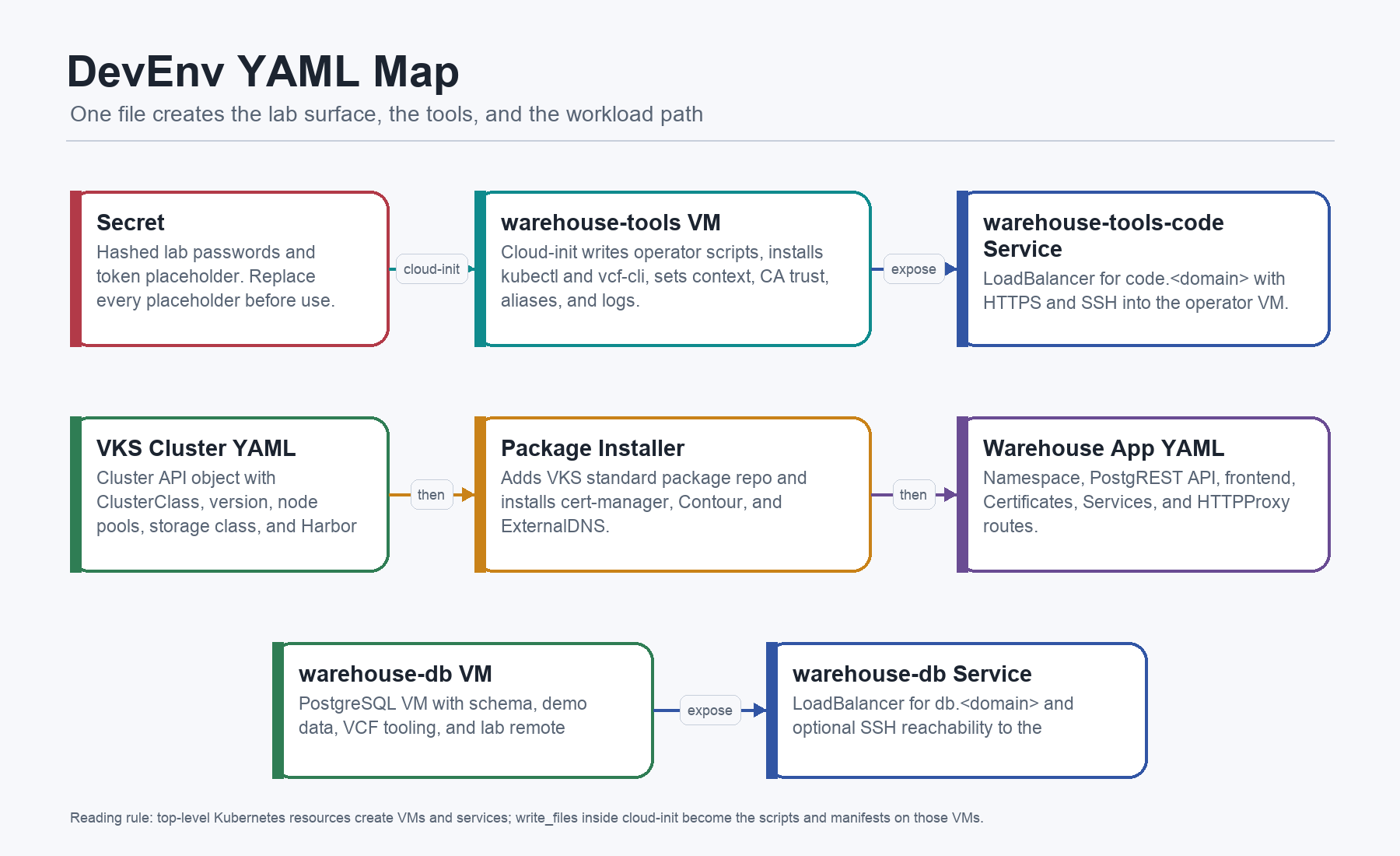
At the top level, the current devenv.example.yaml creates five Kubernetes resources:
Secret ubuntu-jumpserver-bootstrap-secret: lab password hashes for the VM users.VirtualMachine warehouse-tools: operator VM withkubectl,vcf-cli, CA trust, context setup, package scripts, app manifests, and optional code-server assets.VirtualMachineService warehouse-tools-code: LoadBalancer forcode.<app-domain>exposing HTTPS and SSH to the tools VM.VirtualMachine warehouse-db: PostgreSQL VM with schema, demo data, VCF tooling, and lab remote access.VirtualMachineService warehouse-db: LoadBalancer fordb.<app-domain>exposing PostgreSQL and optional SSH to the DB VM.
Inside the two VirtualMachine objects, cloud-init writes the actual working files. That is the important detail. Paths like /home/vmware/20-install-platform-packages.sh are not files you need to fetch from a second repo. They are created by the DevEnv itself.
The Complete Object Inventory
This is the review checklist for the file. If something is declared in the YAML, it should either be part of this inventory or be an implementation detail of one of these rows.
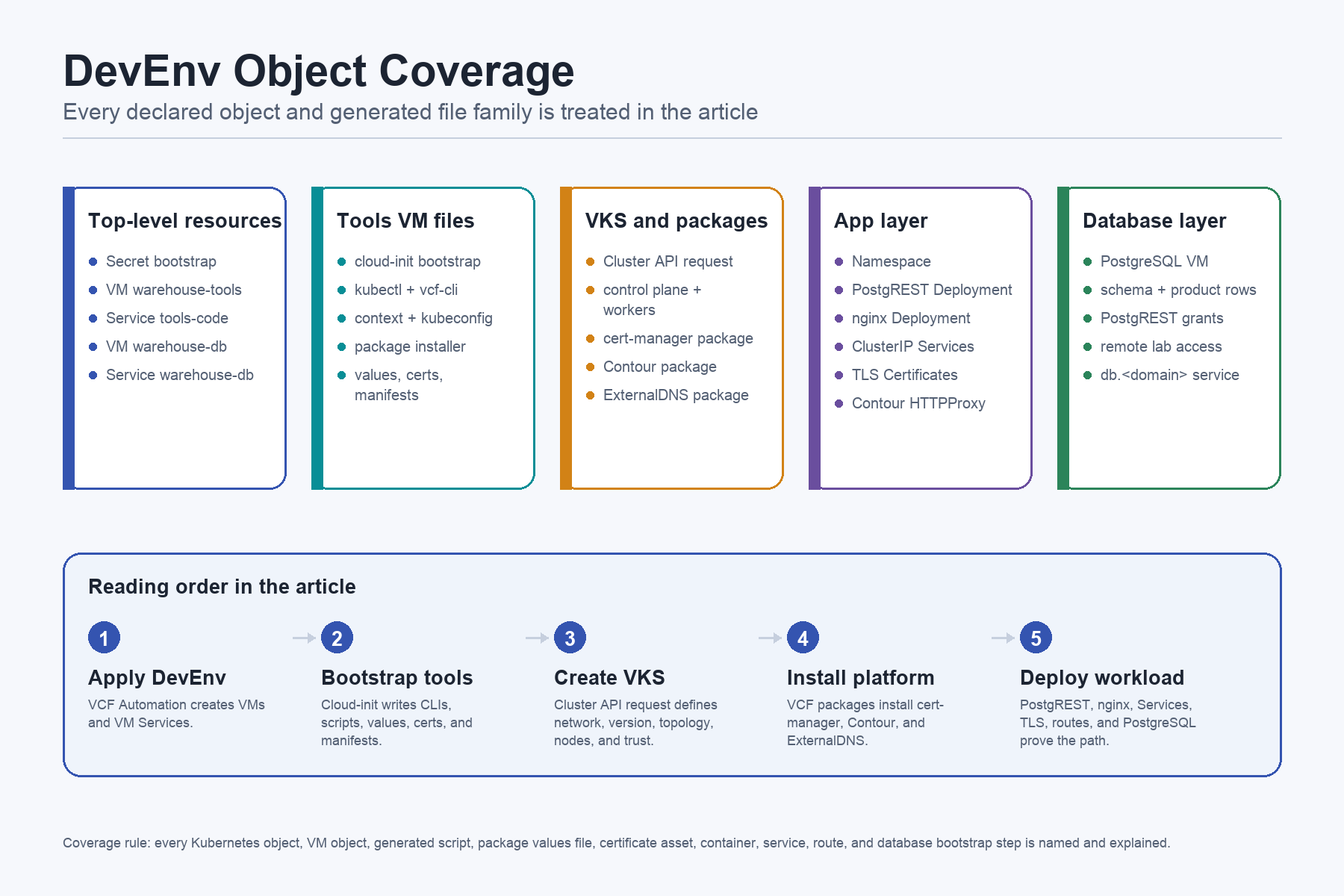
The top-level objects are the VCF Automation contract. They create the lab surfaces:
Secret ubuntu-jumpserver-bootstrap-secret: lab bootstrap identity material.VirtualMachine warehouse-tools: operator execution environment.VirtualMachineService warehouse-tools-code: lab entrypoint for HTTPS and SSH to the tools VM.VirtualMachine warehouse-db: PostgreSQL backing service.VirtualMachineService warehouse-db: LoadBalancer and DNS bridge for PostgreSQL and optional SSH.
The tools VM writes the platform bundle. These are not decorative files. They are the runnable operator model:
/etc/ssh/sshd_config.d/90-password.conf: makes the lab VM reachable with the declared lab account model./etc/vcf-api-token: local token placeholder used by the VCF context scripts./etc/profile.d/10-xdg.sh: keeps CLI config, cache, and state paths predictable./etc/profile.d/20-kubectl-alias.shand/etc/bash.bashrc.d/20-kubectl-alias.sh: addkubectlcompletion and thekalias in login and interactive shells./usr/local/share/ca-certificates/example-root.crt,/usr/local/share/ca-certificates/vcf-auto-ca.crt, and/usr/local/share/ca-certificates/ops-fleet-ca.crt: put platform and lab trust roots into the OS trust store before CLI calls./etc/profile.d/30-vcfa-token.shand/etc/bash.bashrc.d/30-vcfa-token.sh: export token variables expected by VCF andkubectlauth flows./home/vmware/bootstrap.sh: runs every automatic bootstrap script in order and writes logs./opt/bootstrap.auto.d/00-tools-setup.sh: installs base packages,kubectl,vcf-cli, completion, CA trust, and the base VCF context./home/vmware/10-create-cluster.sh: applies the VKSCluster, waits for readiness, registers the JWT authenticator, and retrieves kubeconfig./home/vmware/20-install-platform-packages.sh: adds the package repo and installs cert-manager, Contour, and ExternalDNS./home/vmware/40-deploy-app.sh: applies the app manifest, waits for Certificates, waits for Deployments, and prints HTTPProxy status./opt/warehouse-platform/extdns.values.yaml: ExternalDNS RFC2136 values for service, ingress, and Contour HTTPProxy sources./opt/warehouse-platform/contour-data.values.yml: Contour and Envoy values, including Envoy as a LoadBalancer Deployment./opt/warehouse-platform/k8s/secret-supervisor-subca.yaml: cert-manager TLS Secret for the SubCA./opt/warehouse-platform/k8s/clusterissuer-supervisor-subca.yamland/opt/warehouse-platform/k8s/cluster-issuer-supervisor-subca.yaml: primary and compatibility filenames for the sameClusterIssuer./opt/warehouse-platform/certs/k8s-subca-fullchain.pemand/opt/warehouse-platform/certs/k8s-subca.key: optional raw PEM path when creating the SubCA Secret from files./opt/warehouse-platform/k8s/code-cert.yaml: optionalCertificateforcode.<app-domain>./opt/warehouse-platform/scripts/install-coder.sh: optional code-server installer and systemd unit./opt/warehouse-platform/k8s/cluster-warehouse.yaml: VKS Cluster API request./opt/warehouse-platform/k8s/warehouse-app.yaml: ten-object app manifest: namespace, API, frontend, Services, Certificates, and HTTPProxy routes.
The DB VM has its own smaller bootstrap inventory:
/etc/ssh/sshd_config.d/90-password.conf,/etc/vcf-api-token, alias files, CA files, and token-export files: same lab reachability, trust, and VCF CLI usability pattern as the tools VM./home/vmware/bootstrap.sh: runs automatic DB bootstrap scripts and writes logs./opt/bootstrap.auto.d/00-vcf-bootstrap.sh: installsvcf-cli,kubectl, optional helpers, and the VCF context on the DB VM./opt/bootstrap.auto.d/10-db-setup.sh: installs PostgreSQL, creates theacmerole, database, table, rows, and grants./opt/bootstrap.auto.d/15-db-remote-access.sh: opens PostgreSQL for lab remote access throughscram-sha-256.
The embedded manifests are the objects the later sections explain in detail:
cluster-warehouse.yaml:Cluster warehousewith network, topology, version, trust, control plane, and worker pool.secret-supervisor-subca.yaml:Secret cert-manager/supervisor-subca.clusterissuer-supervisor-subca.yaml:ClusterIssuer supervisor-subca.cluster-issuer-supervisor-subca.yaml: compatibility copy ofClusterIssuer supervisor-subca.code-cert.yaml:Certificate warehouse-ns/code-tls.warehouse-app.yaml:Namespace warehouse-app,Deployment warehouse-api,Service warehouse-api,Certificate api-tls,HTTPProxy warehouse-api,ConfigMap warehouse-frontend-html,Deployment warehouse-frontend,Service warehouse-frontend,Certificate app-tls, andHTTPProxy warehouse-frontend.
Where Commands Run
The build crosses five execution contexts. Keep those separate and the whole example becomes much easier to reason about.
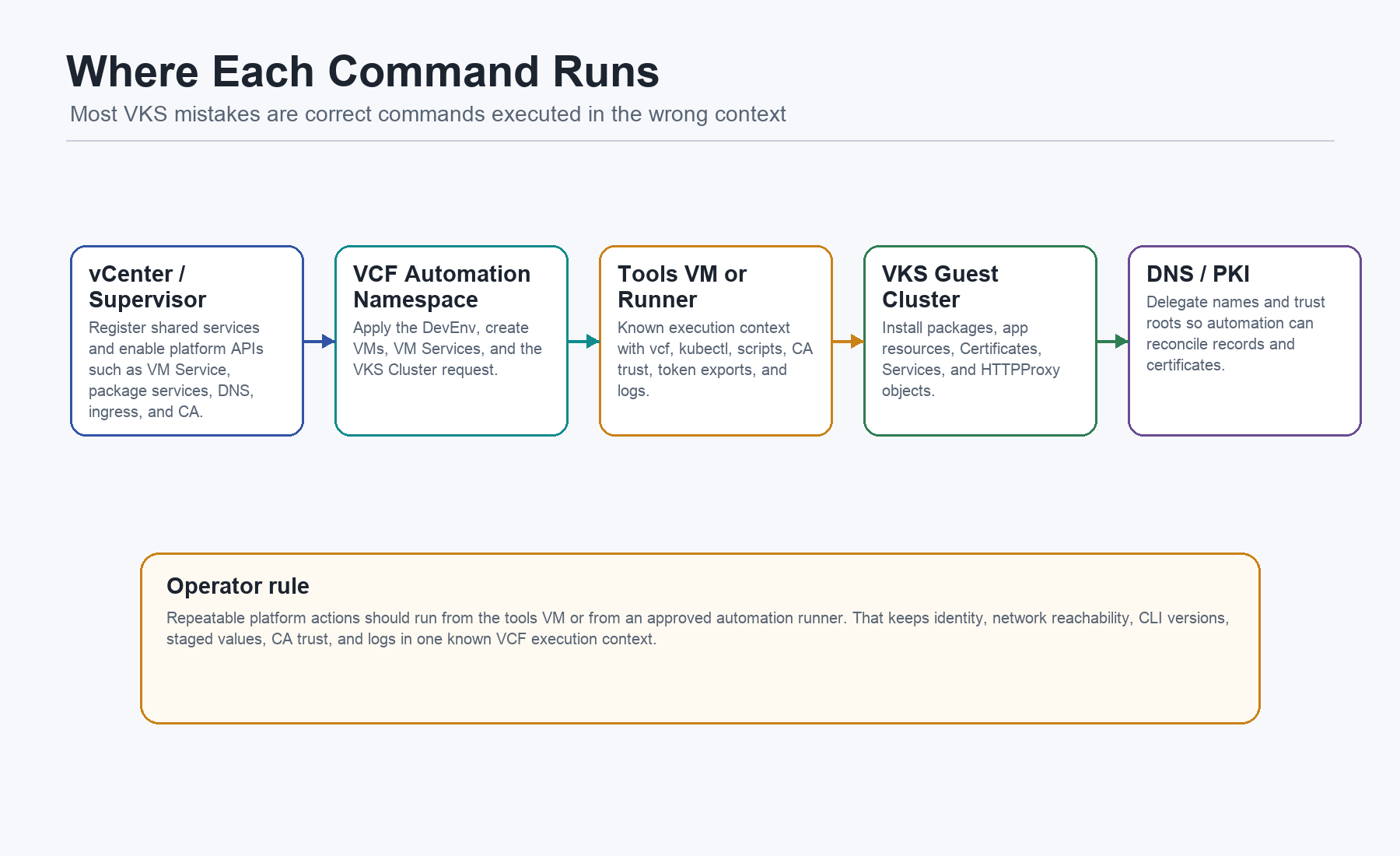
- vCenter or Supervisor administration: platform administrator actions register shared services and make VM Service, package, DNS, ingress, and CA capabilities available.
- VCF Automation namespace:
kubectl apply -f devenv.example.yamlcreates the VMs, VM Services, and VKS cluster request in the governed namespace. - Tools VM:
/home/vmware/*.shscripts install CLIs, create VCF contexts, apply the cluster, install packages, deploy the app, and inspect logs. - VKS guest cluster: app and add-on resources run
warehouse-app, ContourHTTPProxy, cert-managerCertificate, Services, and Deployments. - DNS and PKI: external systems delegate names, provide trust roots, and allow automated DNS or certificate reconciliation.
Repeatable work happens from the tools VM or from an approved automation runner. That is the clean VCF example: the operator path depends on a known execution context with the right identity, network path, CA trust, CLI versions, staged values, and logs. In a larger environment, the same sequence should move into GitOps or CI, with the tools VM replaced or reduced to a debug cockpit.
Prep Before The DevEnv
Before applying the DevEnv, I want the boring platform dependencies to be explicit. The YAML can create VMs, write scripts, request a VKS cluster, install packages, and deploy the app. It should not hide the fact that DNS, trust, package access, registry access, and credentials have to be prepared.
Use this as the prep checklist:
- VCF Automation endpoint: the tools VM can reach
https://<vcf-automation-fqdn>. Quick check:curl -I https://<vcf-automation-fqdn>. - Tenant, project, namespace: the API token can use
<vcf-automation-org>,warehouse-project, andwarehouse-ns. Quick check:vcf context create --type cci .... - VKS package access: the VCF package workflow can see the VKS standard package repository. Quick check:
vcf package available list -n cert-manager. - Registry path: VKS nodes can pull
<registry-domain>/cache/postgrest/...and<registry-domain>/cache/nginxinc/.... Quick check:curl -I https://<registry-domain>/v2/. - DNS zone:
<app-domain>is delegated or hosted where ExternalDNS can update it. Quick check:dig @<dns-server-ip> SOA <app-domain>. - Trust roots: VMs and VKS nodes can trust VCF, registry, package, and app certificate paths. Quick check:
update-ca-certificatesand a TLS smoke test. - Certificate issuer material: cert-manager can create or use
ClusterIssuer supervisor-subca. Quick check:kubectl get clusterissuer supervisor-subca. - Lab credentials: password hashes, SSH keys, DB password, code-server password, and token placeholders are replaced. Quick check: run a public-safety scan before commit.
That order matters. DNS zone readiness comes before DNS reconciliation. Certificate material comes before app Certificates. Package access comes before cert-manager, Contour, and ExternalDNS installation. Registry trust comes before VKS nodes can pull the app images. If those pieces are unclear, the failure later looks like “Kubernetes is broken”, even when the real issue is a missing infrastructure prerequisite.
LAB WARNING: Do not paste real API tokens, private keys, real SubCA material, or reusable passwords into a public YAML. The public example keeps placeholders so people can understand the shape without inheriting private lab state.
Infrastructure Setup
This is the part I do not want to hand-wave. The DevEnv is the application/platform handoff, but a few infrastructure rails must exist first: DNS, certificates, ingress, package access, and registry trust.
DNS For ExternalDNS
DNS is where platform work often falls back to tickets. In this example, the endpoint names are declared and reconciled instead:
external-dns.alpha.kubernetes.io/hostname: db.<app-domain>The same idea is used for app.<app-domain>, api.<app-domain>, db.<app-domain>, and code.<app-domain>. ExternalDNS watches Services, Ingresses, and Contour HTTPProxy resources, then reconciles records into the configured zone.
First verify that the zone exists and that you are talking to the DNS server you expect:
DNS_SERVER=<dns-server-ip>
ZONE=<app-domain>

dig @"${DNS_SERVER}" SOA "${ZONE}"
dig @"${DNS_SERVER}" NS "${ZONE}"
Then run a plain RFC2136 smoke test before you ask ExternalDNS to reconcile real platform records:
DNS_SERVER=<dns-server-ip>
ZONE=<app-domain>
TEST_NAME=externaldns-smoke
TEST_IP=<temporary-test-ip>

cat > /tmp/warehouse-rfc2136-smoke.nsupdate <<EOF
server ${DNS_SERVER}
zone ${ZONE}.
update delete ${TEST_NAME}.${ZONE}. A
update add ${TEST_NAME}.${ZONE}. 60 A ${TEST_IP}
send
EOF

nsupdate -v /tmp/warehouse-rfc2136-smoke.nsupdate
dig @"${DNS_SERVER}" +short "${TEST_NAME}.${ZONE}"
Clean up the smoke record afterwards:
cat > /tmp/warehouse-rfc2136-cleanup.nsupdate <<EOF
server ${DNS_SERVER}
zone ${ZONE}.
update delete ${TEST_NAME}.${ZONE}. A
send
EOF

nsupdate -v /tmp/warehouse-rfc2136-cleanup.nsupdate
dig @"${DNS_SERVER}" +short "${TEST_NAME}.${ZONE}"
LAB-ONLY / insecure: The smoke test above mirrors the sample
--rfc2136-insecureposture. It proves mechanics in an isolated lab. It is not a production DNS security model.
For a production-like RFC2136 path, make authentication explicit:
nsupdate -v -k /etc/external-dns/rfc2136.key /tmp/warehouse-rfc2136-smoke.nsupdateIf the DNS service is Windows DNS, the same prep step can be done with PowerShell. In an isolated lab, this is the kind of command sequence I mean:
$DnsServer = "<dns-server-name-or-ip>"
$Zone = "<app-domain>"
$TestName = "externaldns-smoke"
$TestIp = "<temporary-test-ip>"

Get-DnsServerZone -ComputerName $DnsServer -Name $Zone
Set-DnsServerPrimaryZone -ComputerName $DnsServer -Name $Zone -DynamicUpdate NonsecureAndSecure
Add-DnsServerResourceRecordA -ComputerName $DnsServer -ZoneName $Zone -Name $TestName -IPv4Address $TestIp -TimeToLive 00:01:00
Resolve-DnsName "${TestName}.${Zone}" -Server $DnsServer
Remove-DnsServerResourceRecord -ComputerName $DnsServer -ZoneName $Zone -RRType A -Name $TestName -Force
LAB-ONLY / insecure:
NonsecureAndSecureis a lab shortcut. For production, use secure dynamic updates or a DNS provider integration with scoped credentials, and let ExternalDNS hold only the minimum permission it needs for the delegated zone.
The ExternalDNS values in the DevEnv then make the controller behavior explicit:
deployment:
  args:
    - --registry=txt
    - --txt-prefix=external-dns-
    - --txt-owner-id=k8s
    - --provider=rfc2136
    - --rfc2136-host=<dns-server-ip>
    - --rfc2136-zone=<app-domain>
    - --rfc2136-insecure
    - --domain-filter=<app-domain>
    - --source=service
    - --source=ingress
    - --source=contour-httpproxy
--source=service is why LoadBalancer Services such as warehouse-db and warehouse-tools-code can publish names. --source=contour-httpproxy is what makes the HTTP routing model fit the same DNS loop. The TXT registry gives ExternalDNS ownership tracking so automated DNS does not become a shared-zone mess.
Certificates For cert-manager
The certificate story has three layers.
First, the VMs receive OS trust roots under /usr/local/share/ca-certificates/ and run update-ca-certificates. That is for outbound trust from scripts and CLIs.
Second, the VKS cluster receives CA material through osConfiguration.trust.additionalTrustedCAs. That is for node-level trust, especially when images or platform endpoints use internal certificates.
Third, cert-manager gets a SubCA through a Kubernetes TLS Secret and exposes it as ClusterIssuer supervisor-subca. That is what the app Certificates use.
The public DevEnv supports the YAML Secret path:
apiVersion: v1
kind: Secret
metadata:
  name: supervisor-subca
  namespace: cert-manager
type: kubernetes.io/tls
data:
  tls.crt: <base64-subca-fullchain>
  tls.key: <base64-subca-private-key>

---

apiVersion: cert-manager.io/v1
kind: ClusterIssuer
metadata:
  name: supervisor-subca
spec:
  ca:
    secretName: supervisor-subca
If you prepare the base64 values from a Windows admin workstation in a lab, PowerShell can make the transformation explicit:
$CertPath = ".\k8s-subca-fullchain.pem"
$KeyPath = ".\k8s-subca.key"

$TlsCrt = [Convert]::ToBase64String([IO.File]::ReadAllBytes($CertPath))
$TlsKey = [Convert]::ToBase64String([IO.File]::ReadAllBytes($KeyPath))

"tls.crt: $TlsCrt"
"tls.key: $TlsKey"
LAB WARNING: The private key behind
tls.keyis sensitive. In a serious environment, do not commit it to Git and do not leave it in a public DevEnv. Use a secret manager, a sealed secret workflow, a platform CA integration, or a short-lived lab SubCA that can be thrown away.
The DevEnv also supports the raw PEM path. If /opt/warehouse-platform/certs/k8s-subca-fullchain.pem and /opt/warehouse-platform/certs/k8s-subca.key are present, the package script can create the Secret without hand-writing base64:
kubectl -n cert-manager create secret tls supervisor-subca \
  --cert=/opt/warehouse-platform/certs/k8s-subca-fullchain.pem \
  --key=/opt/warehouse-platform/certs/k8s-subca.key \
  --dry-run=client -o yaml \
  | kubectl apply -f -
After cert-manager and the ClusterIssuer are installed, run a tiny issuer smoke test:
apiVersion: cert-manager.io/v1
kind: Certificate
metadata:
  name: clusterissuer-smoke
  namespace: warehouse-app
spec:
  secretName: clusterissuer-smoke-tls
  commonName: smoke.<app-domain>
  duration: 24h
  dnsNames:
    - smoke.<app-domain>
  issuerRef:
    name: supervisor-subca
    kind: ClusterIssuer
And verify it:
kubectl get clusterissuer supervisor-subca
kubectl -n warehouse-app apply -f clusterissuer-smoke.yaml
kubectl -n warehouse-app wait --for=condition=Ready certificate/clusterissuer-smoke --timeout=2m
kubectl -n warehouse-app get certificate clusterissuer-smoke
kubectl -n warehouse-app delete certificate clusterissuer-smoke
kubectl -n warehouse-app delete secret clusterissuer-smoke-tls
That small test answers an important question before you debug the app: can the platform issuer create a usable TLS Secret in the workload namespace?
Contour, ExternalDNS, And Package Access
The current public DevEnv installs cert-manager, Contour, and ExternalDNS through the VCF package workflow. The operating model is still infrastructure-first:
- cert-manager must exist before app
Certificateresources can become Ready. ClusterIssuer supervisor-subcamust exist beforeapi-tls,app-tls, orcode-tlscan be issued.- Contour and Envoy must exist before
HTTPProxyroutes can carry traffic. - ExternalDNS must be configured before declared hostnames become real DNS records.
- The VKS package repository must be reachable before any of those add-ons install cleanly.
That is why /home/vmware/20-install-platform-packages.sh comes before /home/vmware/40-deploy-app.sh. The sequence is not arbitrary. It is the difference between deploying workloads into a prepared platform and asking an app manifest to bootstrap the platform around itself.
The Operator Runbook
The happy path is short:
# From the VCF Automation namespace context
kubectl -n warehouse-ns apply -f devenv.example.yaml
kubectl -n warehouse-ns get virtualmachines
kubectl -n warehouse-ns get virtualmachineservices

# After warehouse-tools is reachable
ssh vmware@code.<app-domain>

# On the tools VM
/home/vmware/10-create-cluster.sh
/home/vmware/20-install-platform-packages.sh
/home/vmware/40-deploy-app.sh

# Optional, if you want browser IDE access on code.<app-domain>
/opt/warehouse-platform/scripts/install-coder.sh
Those paths are current. The DevEnv writes the manual operator scripts into /home/vmware/ and uses /opt/bootstrap.auto.d/ only for automatic VM bootstrap.
Secret And Cloud Init
The first object is intentionally boring and important:
apiVersion: v1
kind: Secret
metadata:
  name: ubuntu-jumpserver-bootstrap-secret
  namespace: warehouse-ns
type: Opaque
stringData:
  root-passwd: "<hashed-lab-password>"
  vmware-passwd: "<hashed-lab-password>"
The two VMs use that secret for the vmware and root lab accounts. This is not a production login model. It is a lab convenience so the example is reproducible. In production, this becomes key-only SSH, scoped identities, no root login, and no password login.
The tools VM then writes several categories of files:
- SSH policy:
/etc/ssh/sshd_config.d/90-password.confgives the lab VM reproducible reachability. - VCF token placeholder:
/etc/vcf-api-tokenis the local file read by the context scripts. - Shell defaults:
/etc/profile.d/10-xdg.shkeeps config and cache paths stable. kubectlusability:/etc/profile.d/20-kubectl-alias.shadds thekalias and completion in login shells.- Token exports:
/etc/profile.d/30-vcfa-token.shexportsVCFA_TOKENandKUBECTL_VCFA_TOKEN. - CA trust:
/usr/local/share/ca-certificates/*.crtinstalls internal CA material before CLI calls. - Auto bootstrap:
/home/vmware/bootstrap.shand/opt/bootstrap.auto.d/00-tools-setup.shinstall tooling and select the base context. - Manual scripts:
/home/vmware/10-create-cluster.sh,/home/vmware/20-install-platform-packages.sh, and/home/vmware/40-deploy-app.share the ordered operator flow. - Platform bundle:
/opt/warehouse-platform/...holds values, cluster YAML, app YAML, certificates, and the optional code-server installer.
That is the pattern I like: one declared environment, but the generated machine is still inspectable. You can SSH in, read the scripts, tail the bootstrap logs, and understand what happened.
Installing kubectl And VCF CLI
Broadcom’s VCF CLI documentation says the VCF CLI is the command-line interface for VCF Automation and Supervisor environments, and that kubectl is required for Kubernetes operations. The docs list browser download paths through the VCF Automation tenant portal, the Supervisor home page, and the Broadcom Support portal. The lab automates Linux installation from the Broadcom package repository so cloud-init can do it without a browser.
The tools VM installs base packages, then fetches kubectl:
sudo apt-get install -y \
  ca-certificates curl gpg git jq bash-completion wget \
  lsb-release apt-transport-https openssl postgresql-client-16

if ! command -v kubectl >/dev/null 2>&1; then
  ARCH=$(uname -m | sed 's/x86_64/amd64/;s/aarch64/arm64/')
  K_VER="$(curl -Ls https://dl.k8s.io/release/stable.txt)"
  curl -fsSL -o /tmp/kubectl \
    "https://dl.k8s.io/release/${K_VER}/bin/linux/${ARCH}/kubectl"
  sudo install -o root -g root -m 0755 /tmp/kubectl /usr/local/bin/kubectl
fi

kubectl completion bash | sudo tee /etc/bash_completion.d/kubectl >/dev/null || true
Then it installs vcf-cli and completion:
PACKAGES_KEY_URL="https://packages.broadcom.com/artifactory/api/security/keypair/PackagesKey/public"
VCF_KEYRING="/etc/apt/keyrings/vcf-archive-keyring.gpg"
VCF_REPO_URL="https://packages.broadcom.com/artifactory/vcfcli-debian"

sudo mkdir -p /etc/apt/keyrings
curl -fsSL "$PACKAGES_KEY_URL" | sudo gpg --dearmor -o "$VCF_KEYRING"
echo "deb [signed-by=${VCF_KEYRING}] ${VCF_REPO_URL} $(lsb_release -cs) main" \
  | sudo tee /etc/apt/sources.list.d/vcf.list >/dev/null

sudo apt-get update -y
sudo apt-get install -y vcf-cli
vcf completion bash | sudo tee /etc/bash_completion.d/vcf >/dev/null || true
This is why the tools VM is worth having. It is not just a jump host. It becomes the controlled execution environment where the CLI versions, shell behavior, trust store, contexts, and logs are reproducible.
VCF Contexts And Kubeconfig
VCF CLI contexts are the bridge between the operator VM and VCF Automation. Broadcom’s quick start describes a cci context for VCF Automation using an API token, and then switching into a namespace or project context for cluster work.
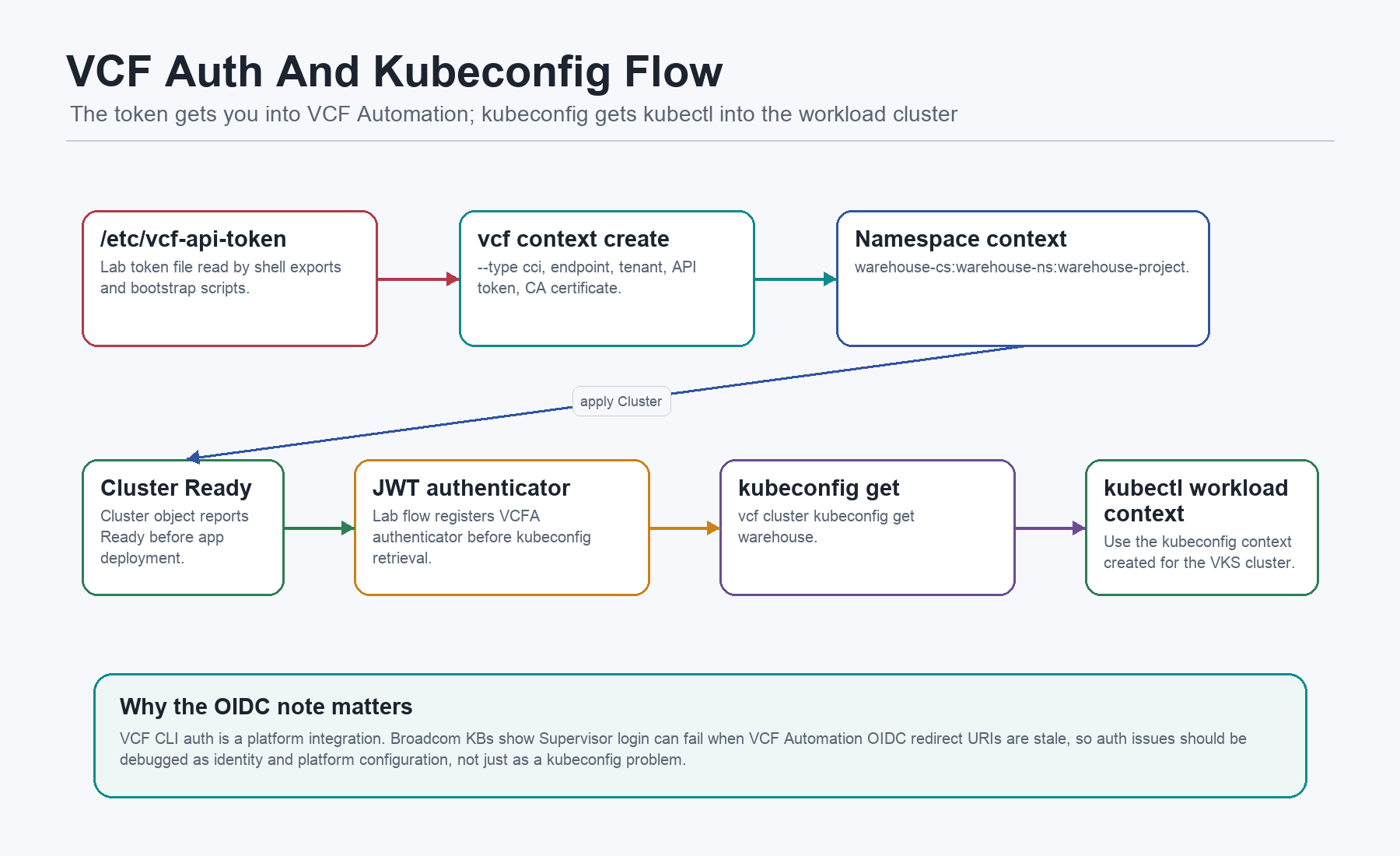
The auto bootstrap creates the base VCF Automation context:
ENDPOINT="https://<vcf-automation-fqdn>"
TENANT="<vcf-automation-org>"
CONTEXT_BASE="warehouse-cs"
NS="warehouse-ns"
PROJECT="warehouse-project"
API_TOKEN=$(sudo sed -e 's/[[:space:]]//g' /etc/vcf-api-token)

vcf context create "${CONTEXT_BASE}" \
  --type cci \
  --endpoint "${ENDPOINT}" \
  --api-token "${API_TOKEN}" \
  --tenant-name "${TENANT}" \
  --set-current \
  --ca-certificate /usr/local/share/ca-certificates/ops-fleet-ca.crt || true

vcf context use "${CONTEXT_BASE}:${NS}:${PROJECT}" || true
/home/vmware/10-create-cluster.sh repeats the context setup idempotently, applies the VKS cluster manifest, waits for readiness, and then retrieves a kubeconfig:
kubectl apply -n "${NS}" -f "/opt/warehouse-platform/k8s/cluster-warehouse.yaml"

# The script waits up to 90 minutes and prints phase, control-plane and worker readiness.

vcf cluster register-vcfa-jwt-authenticator "${CLUSTER}" || true
vcf cluster kubeconfig get "${CLUSTER}" || true

CTX=$(kubectl config get-contexts -o name \
  | grep -E "^vcf-cli-${CLUSTER}-${NS}@${CLUSTER}-${NS}$" || true)
kubectl config use-context "${CTX}"
The JWT authenticator line deserves a plain explanation. The lab uses it so the retrieved workload kubeconfig can authenticate through the VCF Automation path. The public VCF CLI quick start documents API-token CCI contexts and vcf cluster kubeconfig get. Broadcom KBs also show that Supervisor login through VCF CLI depends on healthy VCF Automation and OIDC redirect configuration. So if this breaks, do not debug it as “just a kubeconfig file”. Check the identity path, the VCF Automation org, the Supervisor identity provider, and the redirect URIs.
The VKS Cluster Request
The cluster manifest is a Cluster API object. That matters because VKS is not inventing a random YAML dialect. The official VKS API docs describe VKS as a declarative Cluster API based way to define cluster topology, node pools, VM classes, storage policies, and networking.
The current DevEnv writes this to /opt/warehouse-platform/k8s/cluster-warehouse.yaml:
apiVersion: cluster.x-k8s.io/v1beta1
kind: Cluster
metadata:
  name: warehouse
  namespace: warehouse-ns
spec:
  clusterNetwork:
    pods:
      cidrBlocks:
        - 192.168.156.0/20
    services:
      cidrBlocks:
        - 10.96.0.0/12
    serviceDomain: cluster.local
  topology:
    class: builtin-generic-v3.4.0
    classNamespace: vmware-system-vks-public
    version: v1.33.3---vmware.1-fips-vkr.1
    variables:
      - name: kubernetes
        value:
          certificateRotation:
            enabled: true
            renewalDaysBeforeExpiry: 90
      - name: vmClass
        value: best-effort-small
      - name: storageClass
        value: vsan-default-storage-policy
      - name: osConfiguration
        value:
          trust:
            additionalTrustedCAs:
              - caCert:
                  content: |-
                    <certificate-pem>
    controlPlane:
      replicas: 3
    workers:
      machineDeployments:
        - class: node-pool
          name: warehouse-nodepool-zone01
          replicas: 3
          failureDomain: zone01
The important fields are:
clusterNetwork: pod CIDR, Service CIDR, and service domain for the guest cluster.topology.class: the ClusterClass selected from the platform.classNamespace: where the public VKS ClusterClass lives.version: VKS Kubernetes release version.variables.kubernetes: cluster-level Kubernetes behavior such as certificate rotation.variables.vmClass: default VM class for nodes.variables.storageClass: storage class for node disks.variables.osConfiguration.trust.additionalTrustedCAs: CA material trusted by nodes, useful when images come from an internal registry.controlPlane.replicas: three control-plane nodes in the lab.workers.machineDeployments: one worker pool inzone01with three replicas.
The VKS variable docs are useful here because they explain the hierarchy. Cluster-level variables set defaults. Control-plane and worker-pool variables can override them. In this lab, the defaults are enough, but the shape is ready for per-pool specialization later.
VCF Package Installation
This was missing too much detail before. The current file does not install Contour and ExternalDNS with random Helm commands. It uses the VCF package workflow against a VKS standard package repository.
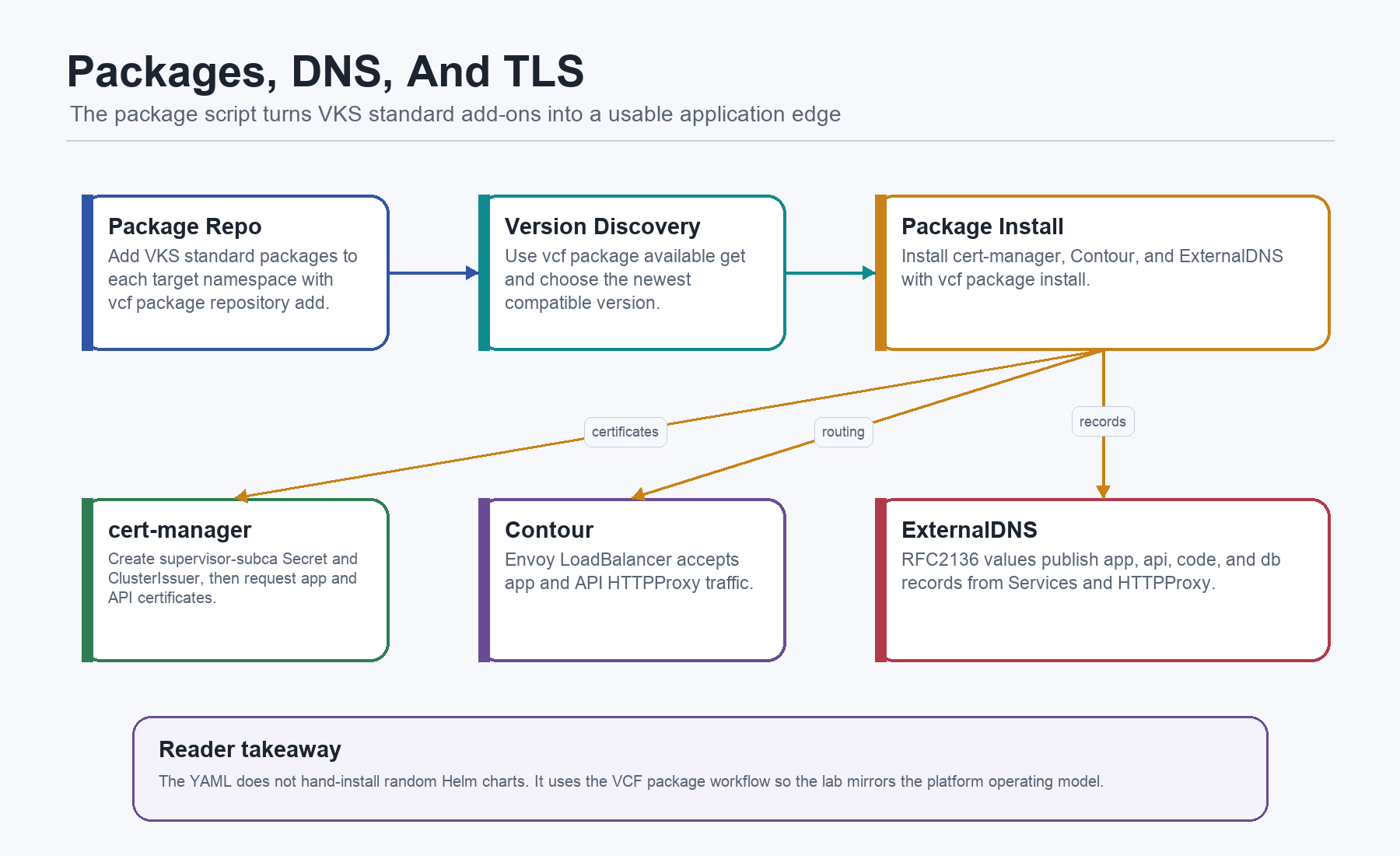
The package installer lives at /home/vmware/20-install-platform-packages.sh. It adds the VKS standard package repository to the target namespaces, discovers package versions, and installs the packages:
REPO_NAME="2025.10.22"
REPO_URL="projects.packages.broadcom.com/vsphere/supervisor/packages/2025.10.22/vks-standard-packages:3.5.0-20251022"

ensure_repo() {
  local ns="$1"
  if ! vcf package repository list -n "$ns" 2>/dev/null | grep -qw "$REPO_NAME"; then
    vcf package repository add "$REPO_NAME" --url "$REPO_URL" -n "$ns"
  fi
}

latest_ver() {
  vcf package available get "$1" -n "$2" 2>/dev/null \
    | awk '/^[[:space:]]*[0-9]+\.[0-9]+\./{print $1}' \
    | sort -Vr \
    | head -1
}
Then it installs by package name:
install_pkg "cert-manager" "cert-manager.kubernetes.vmware.com" "cert-manager"
install_pkg "contour" "contour.kubernetes.vmware.com" "contour" "$CONTOUR_VALUES"
install_pkg "external-dns" "external-dns.kubernetes.vmware.com" "external-dns" "$EXTDNS_VALUES"
Read the package script as six moving parts:
ensure_nscreates the target namespace if it does not exist, so the package install can be repeated without a separate namespace prep step.ensure_repoadds the VKS standard package repository to that namespace, keeping package discovery inside the VCF package model instead of a hidden Helm repo.latest_verreads available versions for a package and picks the newest visible version. That is useful in a lab; production should pin this.install_pkgchecks whether the package is already installed and then callsvcf package install, which makes the script rerunnable.- The ExternalDNS namespace label sets
pod-security.kubernetes.io/enforce=privilegedfor the lab package defaults. In production, validate this against your Pod Security posture. - Rollout and list checks wait for cert-manager deployments and print installed packages across namespaces, giving the operator a real checkpoint before app deployment.
Broadcom examples use the same family of commands: add a VKS standard package repo, inspect available packages, run vcf package install, and list installed packages. The Broadcom package KBs and VKS package examples are also why the article now uses the *.kubernetes.vmware.com package names instead of older Tanzu-era names.
If your installed vcf binary does not expose package subcommands, check the plugin first:
vcf plugin install package
vcf package available list -n tkg-system
In the lab script, version discovery is dynamic so the example tracks what the repository exposes. In production I would normally pin versions deliberately and move the package repository URL and versions into configuration.
Certificates And Trust
The DevEnv handles trust in three layers.
First, the VM operating systems receive CA files under /usr/local/share/ca-certificates/ and run update-ca-certificates. That helps CLI tools trust internal endpoints.
Second, the VKS cluster receives CA material through osConfiguration.trust.additionalTrustedCAs. That is what lets nodes trust internal registry or platform certificates.
Third, cert-manager receives a SubCA as a Kubernetes TLS Secret and a ClusterIssuer:
apiVersion: v1
kind: Secret
metadata:
  name: supervisor-subca
  namespace: cert-manager
type: kubernetes.io/tls
data:
  tls.crt: <base64-subca-fullchain>
  tls.key: <base64-subca-private-key>

---

apiVersion: cert-manager.io/v1
kind: ClusterIssuer
metadata:
  name: supervisor-subca
spec:
  ca:
    secretName: supervisor-subca
The script can either apply the ready-made YAML Secret or create the Secret from raw PEM files:
kubectl -n cert-manager create secret tls "$secret_name" \
  --cert="$cert_file" \
  --key="$key_file" \
  --dry-run=client -o yaml \
  | kubectl apply -f -
That distinction matters. A Kubernetes TLS Secret uses tls.crt and tls.key. Other Supervisor Service or platform configuration screens may use different field names. When a reader mixes those contexts, certificates become confusing very quickly.
The app uses the same issuer for api.<app-domain> and app.<app-domain>, and the optional code-server path uses the same CA material for code.<app-domain>.
DNS And Contour Values
ExternalDNS is configured for an RFC2136 lab zone. The important part is not the exact DNS provider. The important part is that the app expresses hostnames declaratively and the platform reconciles records.
deployment:
  args:
    - --registry=txt
    - --txt-prefix=external-dns-
    - --txt-owner-id=k8s
    - --provider=rfc2136
    - --rfc2136-host=<dns-server-ip>
    - --rfc2136-port=53
    - --rfc2136-zone=<app-domain>
    - --rfc2136-insecure
    - --domain-filter=<app-domain>
    - --source=service
    - --source=ingress
    - --source=contour-httpproxy
--source=service allows records for LoadBalancer Services such as warehouse-tools-code and warehouse-db. --source=contour-httpproxy allows records for Contour HTTPProxy objects such as the app and API routes. The TXT registry gives ownership tracking so automation does not blindly overwrite shared DNS records.
The lab uses --rfc2136-insecure for simplicity. Do not treat that as a production recommendation. Use authenticated DNS updates, a delegated zone, restricted keys, and a narrow domain filter.
Contour is installed with Envoy as a LoadBalancer:
contour:
  replicas: 2
  logLevel: info
  listenIPFamily: IPv4
envoy:
  workload:
    type: Deployment
    replicas: 2
  service:
    type: LoadBalancer
    externalTrafficPolicy: Cluster
Contour gives the app a clean HTTP routing contract. ExternalDNS gives the routes names. cert-manager gives them certificates. The app team should not need to open three tickets to make a simple HTTPS endpoint exist.
The App Bundle
The runtime path is mixed on purpose. The frontend and API are Kubernetes-native. The database remains a VM. VM Service makes that feel like one platform.
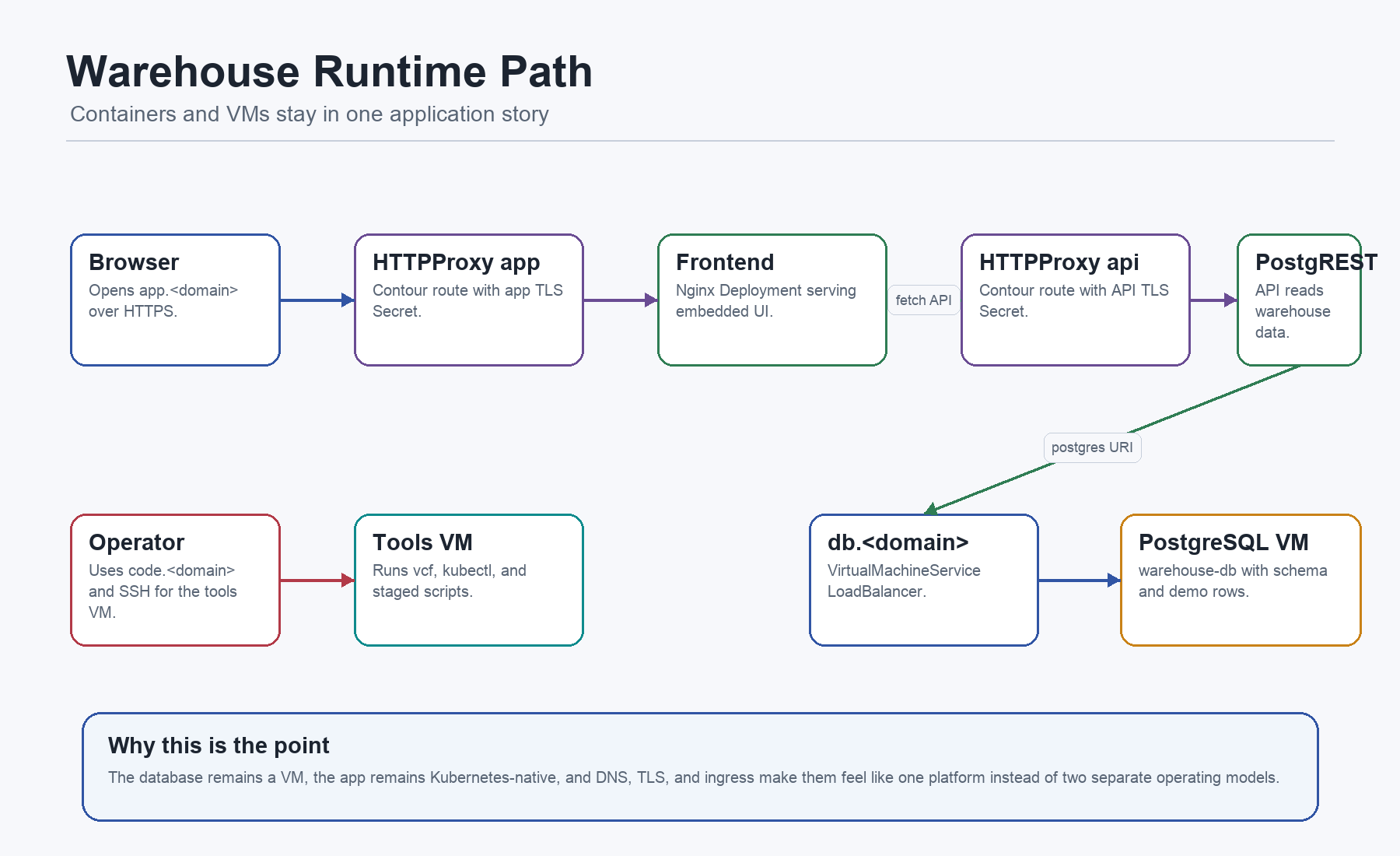
/opt/warehouse-platform/k8s/warehouse-app.yaml contains ten objects:
Namespace warehouse-app: holds the app tier.Deployment warehouse-api: runs PostgREST.Service warehouse-api: exposes the API internally on Service port 80.Certificate api-tls: requests TLS forapi.<app-domain>.HTTPProxy warehouse-api: routes HTTPS traffic to the API Service.ConfigMap warehouse-frontend-html: embeds the small demo frontend.Deployment warehouse-frontend: runs unprivileged nginx on port 8080.Service warehouse-frontend: exposes the frontend internally on Service port 80.Certificate app-tls: requests TLS forapp.<app-domain>.HTTPProxy warehouse-frontend: routes HTTPS traffic to the frontend Service.
The app manifest is easiest to read as two internal workloads and two edge routes.
The API workload is deliberately small. It runs PostgREST, which turns the PostgreSQL schema into an HTTP API:
apiVersion: apps/v1
kind: Deployment
metadata:
  name: warehouse-api
  namespace: warehouse-app
spec:
  replicas: 1
  template:
    spec:
      securityContext:
        seccompProfile:
          type: RuntimeDefault
      containers:
        - name: postgrest
          image: <registry-domain>/cache/postgrest/postgrest:v12.0.2
          securityContext:
            allowPrivilegeEscalation: false
            runAsNonRoot: true
            runAsUser: 1000
            runAsGroup: 1000
            capabilities:
              drop: ["ALL"]
          env:
            - name: PGRST_DB_URI
              value: postgres://acme:<db-password>@db.<app-domain>:5432/acme_warehouse
            - name: PGRST_DB_SCHEMAS
              value: public
            - name: PGRST_DB_ANON_ROLE
              value: acme
            - name: PGRST_SERVER_PORT
              value: "3000"
The important fields are:
image: pulls PostgREST from the internal registry cache. The VKS nodes need CA trust for that path.securityContext: runs as non-root, blocks privilege escalation, drops capabilities, and uses the runtime default seccomp profile.PGRST_DB_URI: connects to PostgreSQL throughdb.<app-domain>, which is backed by the DBVirtualMachineService.PGRST_DB_SCHEMAS: exposes thepublicschema.PGRST_DB_ANON_ROLE: uses theacmePostgreSQL role that the DB bootstrap grants read access to.PGRST_SERVER_PORT: makes the container listen on port 3000.
For a lab, the DB URI is visible so the reader can understand the path. For production, it becomes a Secret or an external secret reference. The architectural contract stays the same: the API reaches PostgreSQL by the platform-owned name db.<app-domain>.
The API Service is the internal contract for that container:
kind: Service
metadata:
  name: warehouse-api
  namespace: warehouse-app
spec:
  type: ClusterIP
  selector:
    app: warehouse-api
  ports:
    - name: http
      port: 80
      targetPort: 3000
That targetPort is the handoff from Kubernetes networking to the container. Contour does not talk to the pod port directly. It routes to the Service on port 80, and the Service forwards to the PostgREST container on 3000.
The API edge is then made of two objects: cert-manager requests a certificate, and Contour consumes the certificate in an HTTPProxy route.
kind: Certificate
metadata:
  name: api-tls
  namespace: warehouse-app
spec:
  secretName: api-app-domain-tls
  dnsNames:
    - api.<app-domain>
  issuerRef:
    name: supervisor-subca
    kind: ClusterIssuer

---

kind: HTTPProxy
metadata:
  name: warehouse-api
  namespace: warehouse-app
spec:
  virtualhost:
    fqdn: api.<app-domain>
    tls:
      secretName: api-app-domain-tls
  routes:
    - services:
        - name: warehouse-api
          port: 80
The frontend is just as concrete. The file embeds the demo UI in a ConfigMap:
kind: ConfigMap
metadata:
  name: warehouse-frontend-html
  namespace: warehouse-app
data:
  index.html: |
    const API='https://api.<app-domain>/products';
That one line explains the browser path. A user opens https://app.<app-domain>. The frontend JavaScript then fetches inventory rows from https://api.<app-domain>/products. If the browser shows the page but no products, you debug the API route, cert, CORS behavior, DNS, and database path, not the nginx container first.
The frontend container is unprivileged nginx serving that ConfigMap as static content:
kind: Deployment
metadata:
  name: warehouse-frontend
  namespace: warehouse-app
spec:
  replicas: 2
  template:
    spec:
      volumes:
        - name: web
          configMap:
            name: warehouse-frontend-html
      containers:
        - name: nginx
          image: <registry-domain>/cache/nginxinc/nginx-unprivileged:1.27-alpine
          securityContext:
            allowPrivilegeEscalation: false
            runAsNonRoot: true
            runAsUser: 101
            runAsGroup: 101
            capabilities:
              drop: ["ALL"]
          ports:
            - containerPort: 8080
          volumeMounts:
            - name: web
              mountPath: /usr/share/nginx/html
The frontend Service repeats the same internal pattern:
kind: Service
metadata:
  name: warehouse-frontend
  namespace: warehouse-app
spec:
  type: ClusterIP
  selector:
    app: warehouse-frontend
  ports:
    - name: http
      port: 80
      targetPort: 8080
The frontend edge repeats the same external pattern with different names:
kind: Certificate
metadata:
  name: app-tls
  namespace: warehouse-app
spec:
  secretName: app-app-domain-tls
  dnsNames:
    - app.<app-domain>
  issuerRef:
    name: supervisor-subca
    kind: ClusterIssuer

---

kind: HTTPProxy
metadata:
  name: warehouse-frontend
  namespace: warehouse-app
spec:
  virtualhost:
    fqdn: app.<app-domain>
    tls:
      secretName: app-app-domain-tls
  routes:
    - services:
        - name: warehouse-frontend
          port: 80
The deploy script validates this object set after applying it:
kubectl apply -f /opt/warehouse-platform/k8s/warehouse-app.yaml
kubectl -n warehouse-app wait --for=condition=Ready certificate/api-tls --timeout=5m || true
kubectl -n warehouse-app wait --for=condition=Ready certificate/app-tls --timeout=5m || true
kubectl -n warehouse-app rollout status deploy/warehouse-api --timeout=5m || true
kubectl -n warehouse-app rollout status deploy/warehouse-frontend --timeout=5m || true
kubectl -n warehouse-app get httpproxy -o wide || true
That is the app layer end to end: ConfigMap becomes static frontend, nginx serves it, PostgREST exposes database rows, Services give stable in-cluster names, Certificates create TLS Secrets, and HTTPProxy objects make both endpoints reachable through Contour.
VM Service As The Bridge
The VM Operator docs describe a VirtualMachine as the desired state for a vSphere VM, with fields such as className, imageName, storageClass, and bootstrap.cloudInit. That is exactly what the DevEnv uses.
The database VM is a real VM:
apiVersion: vmoperator.vmware.com/v1alpha4
kind: VirtualMachine
metadata:
  name: warehouse-db
  namespace: warehouse-ns
  labels:
    app.kubernetes.io/name: warehouse-db
spec:
  className: best-effort-large
  imageName: noble-server-cloudimg-amd64
  storageClass: vsan-default-storage-policy
  powerState: PoweredOn
  bootstrap:
    cloudInit:
      cloudConfig:
        write_files:
          - path: /opt/bootstrap.auto.d/10-db-setup.sh
          - path: /opt/bootstrap.auto.d/15-db-remote-access.sh
And it is exposed through a VirtualMachineService:
apiVersion: vmoperator.vmware.com/v1alpha2
kind: VirtualMachineService
metadata:
  name: warehouse-db
  namespace: warehouse-ns
  annotations:
    external-dns.alpha.kubernetes.io/hostname: db.<app-domain>
spec:
  type: LoadBalancer
  selector:
    app.kubernetes.io/name: warehouse-db
  ports:
    - name: postgres
      protocol: TCP
      port: 5432
      targetPort: 5432
    - name: ssh
      protocol: TCP
      port: 22
      targetPort: 22
This is the architectural point of the example. PostgreSQL does not have to be containerized for the platform to manage its reachability. VM Service exposes a VM-shaped dependency with Kubernetes-style intent, and ExternalDNS can publish the resulting name.
The tools VM uses the same bridge:
apiVersion: vmoperator.vmware.com/v1alpha2
kind: VirtualMachineService
metadata:
  name: warehouse-tools-code
  namespace: warehouse-ns
  annotations:
    external-dns.alpha.kubernetes.io/hostname: code.<app-domain>
spec:
  type: LoadBalancer
  selector:
    app.kubernetes.io/name: warehouse-tools
  ports:
    - name: https
      port: 443
      targetPort: 443
    - name: ssh
      port: 22
      targetPort: 22
The current public example exposes a single warehouse-tools-code service for both HTTPS and SSH.
The Database Bootstrap
The DB side is not just “a VM with Postgres”. It is a small backing-service design with four parts:
VirtualMachine warehouse-dbin the VCF Automation namespace provides the Ubuntu VM, VM class, storage class, labels, cloud-init, and bootstrap scripts.- PostgreSQL bootstrap on the DB VM creates the role, database, table, rows, and grants for PostgREST.
- Remote lab access on the DB VM enables
listen_addresses='*',pg_hba.conf, and optional firewall opening for port 5432. VirtualMachineService warehouse-dbin the VCF Automation namespace provides the LoadBalancer and ExternalDNS hostnamedb.<app-domain>.
The DB VM has its own automatic bootstrap path:
/opt/bootstrap.auto.d/00-vcf-bootstrap.sh
/opt/bootstrap.auto.d/10-db-setup.sh
/opt/bootstrap.auto.d/15-db-remote-access.sh
00-vcf-bootstrap.sh installs VCF CLI, kubectl, completion, optional helpers such as kubectx and k9s, and creates the same VCF Automation context shape as the tools VM. The DB VM is not supposed to become the main operator workstation. The point is that, during a lab, the VM can still inspect its surrounding platform context and produce useful diagnostics.
10-db-setup.sh installs PostgreSQL, creates the acme role, creates the acme_warehouse database, and writes demo rows:
sudo apt-get install -y postgresql
sudo systemctl enable postgresql
sudo systemctl start postgresql

sudo -u postgres psql -c "CREATE USER acme WITH PASSWORD '<db-password>';"
sudo -u postgres createdb -O acme acme_warehouse
The schema is intentionally tiny because the article is about platform plumbing, not inventory software:
CREATE TABLE IF NOT EXISTS products(
  id SERIAL PRIMARY KEY,
  name TEXT,
  sku TEXT,
  stock INT,
  location TEXT,
  image TEXT
);

INSERT INTO products(name, sku, stock, location, image) VALUES
  ('Forklift Model Z', 'FL-Z-100', 10, 'Bay A1', 'https://placehold.co/320x200?text=Forklift'),
  ('Barcode Scanner X5', 'BC-X5-200', 25, 'Bay B3', 'https://placehold.co/320x200?text=Scanner'),
  ('Smart Shelf Controller', 'SSC-700', 5, 'Bay C2', 'https://placehold.co/320x200?text=Controller');
The grants are the part many examples forget. PostgREST does not become useful just because the TCP path works. The database role has to be allowed to connect, use the schema, read the tables, and read sequences:
GRANT CONNECT ON DATABASE acme_warehouse TO acme;
GRANT USAGE ON SCHEMA public TO acme;
GRANT SELECT ON ALL TABLES IN SCHEMA public TO acme;
ALTER DEFAULT PRIVILEGES IN SCHEMA public GRANT SELECT ON TABLES TO acme;
GRANT USAGE, SELECT ON ALL SEQUENCES IN SCHEMA public TO acme;
ALTER DEFAULT PRIVILEGES IN SCHEMA public GRANT USAGE, SELECT ON SEQUENCES TO acme;
That is what makes this API environment functional. The PostgREST container uses PGRST_DB_ANON_ROLE=acme; the DB bootstrap gives acme enough read access to serve /products.
15-db-remote-access.sh makes PostgreSQL listen on all interfaces and allows remote connections:
sudo sed -ri "s/^[#[:space:]]*listen_addresses[[:space:]]*=.*/listen_addresses = '*'/" "$PG_CONF_FILE"

cat >> "$PG_HBA_FILE" <<'EOF'
host    all             all             0.0.0.0/0               scram-sha-256
host    all             all             ::/0                    scram-sha-256
EOF
The VirtualMachineService warehouse-db then exposes that port as a platform object:
kind: VirtualMachineService
metadata:
  name: warehouse-db
  namespace: warehouse-ns
  annotations:
    external-dns.alpha.kubernetes.io/hostname: db.<app-domain>
spec:
  type: LoadBalancer
  selector:
    app.kubernetes.io/name: warehouse-db
  ports:
    - name: postgres
      port: 5432
      targetPort: 5432
    - name: ssh
      port: 22
      targetPort: 22
That is deliberately flagged as lab-only. It makes the example easy to test, but production should restrict source networks, use proper secrets, remove broad SSH exposure, and put database reachability behind a tighter policy. The teaching point still holds: a VM-backed service can be declared, named, and consumed by a Kubernetes-native API without pretending the database is a pod.
Optional Code Surface
The tools VM carries an optional code-server installer:
/opt/warehouse-platform/scripts/install-coder.shIt installs code-server, creates a coder user, generates a TLS certificate for code.<app-domain> from the local SubCA material, and runs code-server on port 443 with systemd. The matching warehouse-tools-code service exposes that port.
This is useful in a lab because it gives you a browser IDE inside the same network and identity context as the platform tooling. In production I would treat it like any other admin surface: SSO or strong auth, short-lived access, restricted network path, and a disposable host or runner model.
What Must Exist Outside The YAML
The file is powerful, but it is not a universe in a bottle. A few things must already be true in the environment:
<vcf-automation-fqdn>: reachable VCF Automation endpoint for thevcf context create --type cciflow.<vcf-automation-org>, project, and namespace: tenant, project, and namespace names that the API token can use.<registry-domain>: registry or registry cache that serves PostgREST and nginx-unprivileged images.<app-domain>: DNS zone whereapp,api,db, andcodenames can be created.<dns-server-ip>: RFC2136-capable DNS target for ExternalDNS in the lab.- CA placeholders: trust roots for VCF Automation, registry access, package access, and SubCA signing.
<db-password>and<code-server-password>: lab credentials. Replace with proper secrets before any serious use.- SSH public key and password hashes: lab operator access to the tools and DB VMs.
This is also why the example is structured as generated files on VMs instead of a pile of copy-paste commands. Once the placeholders are filled, the reader can apply the DevEnv, SSH to the tools VM, and run the three operator scripts in order. The missing state is explicit instead of being hidden in someone’s shell history.
What Is Lab-Only
The public file is useful because it is functional. It is not a production baseline. The file itself flags the risky parts, and the article should do the same.
PRODUCTION: The architecture can stay. The lab shortcuts disappear.
- Password login and root login: useful for reproducible lab reachability; production should use key-only SSH, no root login, federated access, and an audited bastion or runner.
/etc/vcf-api-token: useful for non-interactive VCF CLI context creation; production should use a secret manager, scoped token, short lifetime, and rotation.- Placeholder CA material: useful to show every trust path; production should use real PKI, verified chains, and never commit private keys.
- RFC2136 insecure mode: useful for quick DNS automation in a lab; production should use authenticated DNS updates with scoped keys and delegated zones.
- Windows DNS
NonsecureAndSecure: useful for fast isolated validation; production should use secure dynamic updates or scoped DNS provider credentials. - Broad PostgreSQL access: useful to make the API path obvious; production should use network policy, service-local reachability, and restricted CIDRs.
pg_hba.confallowing all networks: useful to remove network guesswork in a first lab; production should use explicit source CIDRs, private reachability, firewall policy, and audited DB access.- Dynamic package version selection: useful for lab bootstrapping; production should pin versions and promote them through tested upgrade windows.
- Inline DB URI: useful because the data path is readable; production should use a Kubernetes Secret, external secret, or workload identity integration.
- Inline SubCA Secret or raw private key files: useful to show the cert-manager flow end to end; production should use a secret manager, sealed secret, CA integration, or one-time injected secret material.
- Optional code-server on
code.<app-domain>: useful as a browser IDE in the lab context; production should use a short-lived runner, SSO, restricted network path, strong auth, and a disposable host.
The pattern still matters. A production version does not throw the design away. It hardens the identities, secrets, networks, and version pinning while preserving the useful contract: one declared environment, repeatable platform contexts, package-managed add-ons, DNS and TLS reconciliation, VM Service for VM dependencies, and a small app that proves the path.
In a productionized version I would keep the same architecture and change the implementation discipline:
- secrets come from a secret store instead of inline bootstrap content
- VCF authentication avoids long-lived local token files
- VM access is key-based, scoped, and audited
- database credentials are generated, rotated, and injected as Secrets
- certificates are issued through approved
ClusterIssuercontracts - DNS updates use authenticated provider integration
- package versions are pinned and promoted through tested environments
- registry access is private, trusted, and observable
- workload namespaces get policy, quota, ownership, and lifecycle rules
That is the intended evolution: exercise the platform flow first, then harden the same model instead of changing the mental map after the demo works.
Why This Matters
The interesting part of VKS is not that it can run pods. The interesting part is that VCF can make Kubernetes, VMs, DNS, certificates, and package-managed add-ons behave like one platform.
Warehouse is small, but it forces the important questions:
- Can an app team get a cluster without a bespoke infrastructure conversation?
- Can a VM-backed service be consumed by a Kubernetes app without manual glue?
- Can the platform create DNS records and certificates from declared intent?
- Can package installation be done through the VCF operating model instead of ad hoc scripts?
- Can a new operator understand where every command runs?
When the answer is yes, the platform starts feeling like a product instead of a collection of parts.
Sources Checked
I checked the current public Broadcom and VMware documentation while updating the article:
- VCF CLI documentation
- VCF 9 deployment pathways
- VCF CLI quick start
- vSphere Kubernetes Service API overview
- VKS API reference
- VKS cluster configuration variables
- VM Operator API reference
- VM Operator workload docs
- Broadcom KB on VCF CLI Supervisor authentication
- Broadcom KB on VCF CLI Supervisor login behavior
- Broadcom KB showing VCF package install command shape
- VCF blog example for VKS standard package repository and package install
- Broadcom KB on package names moving to kubernetes.vmware.com